Documentation
One OpenAI- and Anthropic-compatible gateway in front of every frontier model. Keep your existing SDK — point it at our base URL and authenticate with your key. Billing is prepaid from your balance; create a key in the dashboard to get started.
https://spiderssense.com/v1sk-uno-…Create one in your dashboard, then use it as the API key / bearer token.Quickstart
One OpenAI-compatible base URL. Send your key as a Bearer token and call any model by its id.
curl https://spiderssense.com/v1/chat/completions \
  -H "Authorization: Bearer sk-uno-YOUR_KEY" \
  -H "Content-Type: application/json" \
  -d '{
    "model": "gpt-5",
    "messages": [{ "role": "user", "content": "Hello!" }]
  }'
OpenCode
Add a provider to your opencode.json (project root or ~/.config/opencode/), then pick a model with /models. The attachment + modalities flags tell OpenCode the model accepts images.
{
  "$schema": "https://opencode.ai/config.json",
  "provider": {
    "spiderssense": {
      "npm": "@ai-sdk/openai-compatible",
      "name": "spiderssense.com",
      "options": {
        "baseURL": "https://spiderssense.com/v1",
        "apiKey": "sk-uno-YOUR_KEY"
      },
      "models": {
        "gpt-5": {
          "attachment": true,
          "tool_call": true,
          "reasoning": true,
          "modalities": { "input": ["text", "image"], "output": ["text"] }
        }
      }
    }
  }
}
Claude Code
Point Claude Code at our endpoint with two environment variables, then run it as usual.
export ANTHROPIC_BASE_URL="https://spiderssense.com"
export ANTHROPIC_AUTH_TOKEN="sk-uno-YOUR_KEY"
export ANTHROPIC_MODEL="claude-sonnet-4"

claude
Claude Desktop
Wire the Claude Desktop app to our gateway through Configure Third-Party Inference. Five clicks, no rebuild, no extra binaries — your existing Claude Desktop talks to every model we host.
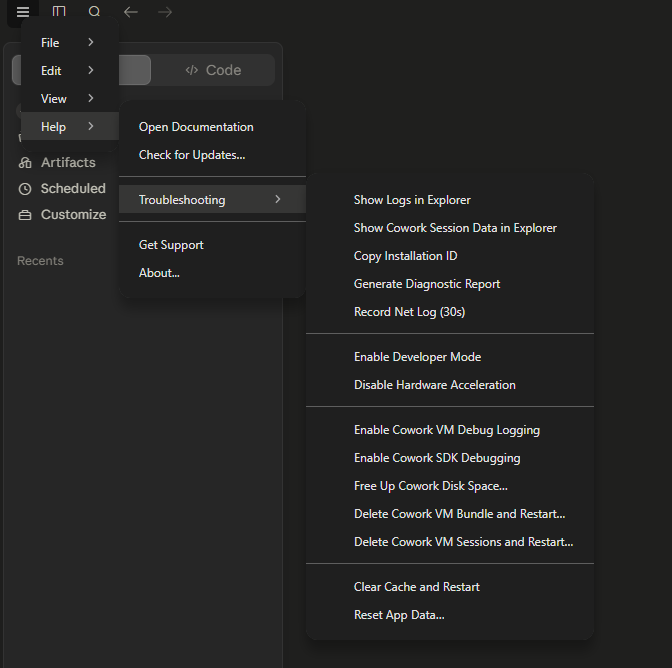
Open Troubleshooting → Enable Developer Mode
Top-left menu → Help → Troubleshooting → Enable Developer Mode. This unlocks the Developer menu used by the next steps.
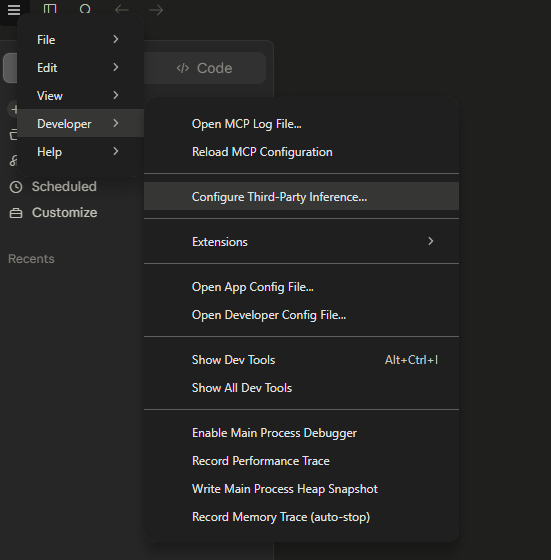
Developer → Configure Third-Party Inference
A new Developer entry appears in the same menu. Open it and pick Configure Third-Party Inference… — this is where Claude Desktop's model routing lives.
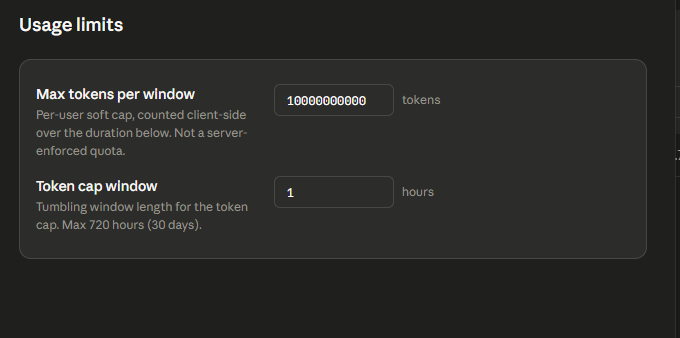
Set generous Usage limits (optional)
Bump Max tokens per window to something large (e.g. 10 000 000 000) and Token cap window to 1 hour. This is just a client-side soft cap — real billing happens on our side.
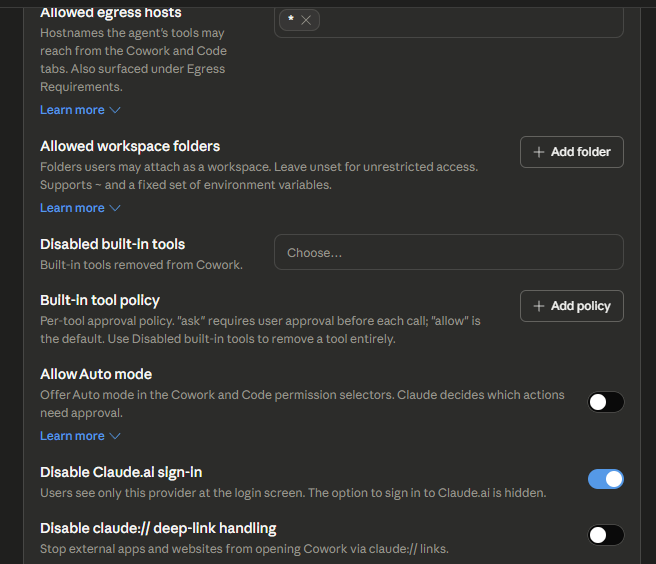
Tighten the sandbox (recommended)
Turn ON Disable Claude.ai sign-in so users only see the gateway provider on the login screen. Leave Allow Auto mode and deep-link handling OFF for a clean managed experience.
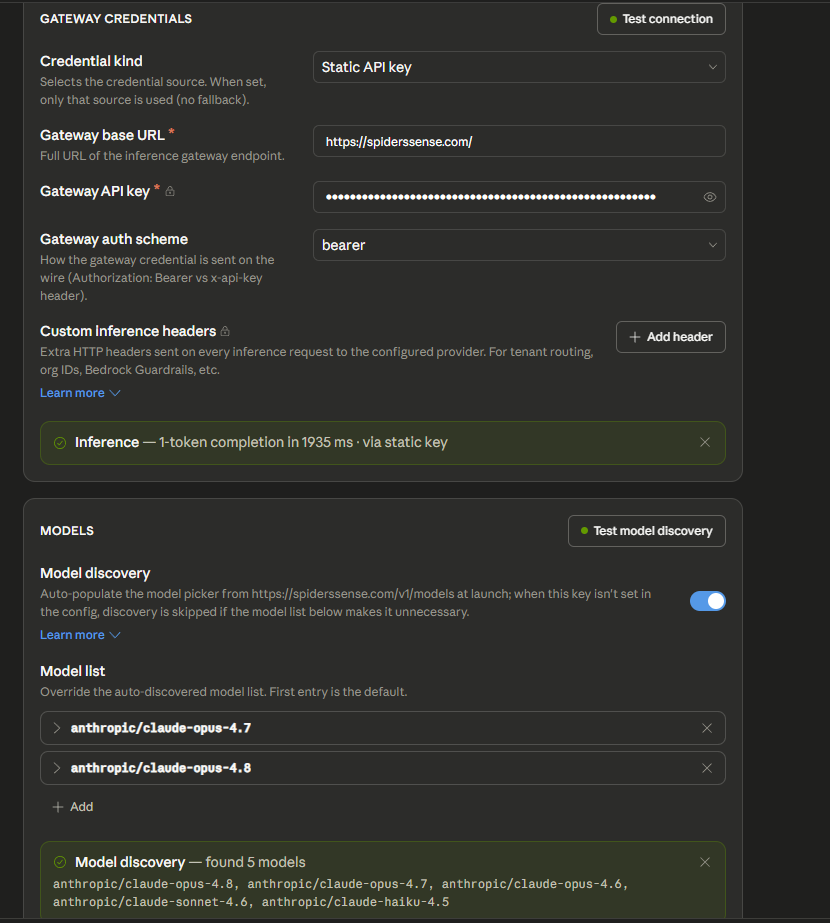
Plug in the gateway credentials
Credential kind: Static API key · Base URL: https://spiderssense.com/ · API key: your sk-uno-… · Auth scheme: bearer. Hit Test connection and Test model discovery — both should turn green and you'll see the full model list auto-populate.
Cursor
Plug our gateway into Cursor as a custom OpenAI-compatible provider. Open Settings → Models → Add custom model, fill in the fields below, then call any frontier model from Chat / Cmd-K.
OpenAI-compatiblehttps://spiderssense.com/v1sk-uno-…Create one in your dashboard and paste it as the OpenAI API key.- Custom API endpoints in Cursor require a Pro plan or higher.
- The 7-day Pro trial does not unlock custom endpoints — paid plans only.
| Alias | Model |
|---|---|
| cursor48 | claude-opus-4.8 |
| cursor47 | claude-opus-4.7 |
| cursor46 | claude-opus-4.6 |
| cursor45 | claude-opus-4.5 |
| cursor46s | claude-sonnet-4.6 |
| cursor45s | claude-sonnet-4.5 |
| cursor45h | claude-haiku-4.5 |
| cursorfable | claude-fable-5 |
| cursorgpt54 | gpt-5.4 |
| cursorgpt55 | gpt-5.5 |
| cursorgpt56 | gpt-5.6-sol |
| cursorgpt56terra | gpt-5.6-terra |
| cursorgpt56luna | gpt-5.6-luna |
| cursorgemini | gemini-3.1-pro-preview |
OpenAI & Anthropic SDK
Drop-in — change only the base URL and the key.
# OpenAI SDK
from openai import OpenAI

client = OpenAI(
    base_url="https://spiderssense.com/v1",
    api_key="sk-uno-YOUR_KEY",
)
resp = client.chat.completions.create(
    model="gpt-5",
    messages=[{"role": "user", "content": "Hello!"}],
)
print(resp.choices[0].message.content)
Key Info API
Programmatic endpoint for resellers and monitoring dashboards. Send your sk-uno-… as a Bearer token — get back the key's balance, spent amount, token counters, request count and status. Public (no session cookie), rate-limited to 60 requests per minute per IP.
curl https://spiderssense.com/v1/key \
-H "Authorization: Bearer sk-uno-YOUR_KEY"{
"data": {
"id": 1050907,
"name": "new",
"key_prefix": "sk-uno-a1da6",
"is_active": true,
"is_expired": false,
"balance": "$31.22",
"balance_micro": 31221741,
"spent": "$18.78",
"spent_micro": 18778259,
"usage": {
"input_tokens": 89167860,
"output_tokens": 637428,
"cached_tokens": 63619449,
"requests": 719
},
"last_used_at": "2026-07-06T15:51:55.000Z",
"created_at": "2026-06-30T18:31:17.000Z",
"expires_at": null
}
}| id | Numeric key id (stable across the key's lifetime). |
| name | Human-readable label you set when creating the key. |
| key_prefix | First 12 chars of the key — safe to display in dashboards. |
| is_active | false if the key was deactivated. Requests will return 401. |
| is_expired | true if expires_at is set and in the past. |
| balance / balance_micro | Remaining prepaid USD on the key. Micro = 1/1,000,000 USD. |
| spent / spent_micro | Lifetime spend on this key. |
| usage.input_tokens | Cumulative input tokens across all requests. |
| usage.output_tokens | Cumulative output tokens. |
| usage.cached_tokens | Cumulative cached-input tokens (charged at cache pricing). |
| usage.requests | Total requests billed to this key. |
| last_used_at | ISO timestamp of the most recent billed request. null if unused. |
| created_at | When the key was created. |
| expires_at | Optional expiry. null means no expiry. |
Count Tokens
Estimate how many input tokens your request will spend BEFORE sending it. Anthropic-compatible endpoint — free, doesn't call the LLM, doesn't decrement your balance. Perfect for cost preview in UIs and budget planning.
curl https://spiderssense.com/v1/messages/count_tokens \
  -H "Authorization: Bearer sk-uno-YOUR_KEY" \
  -H "Content-Type: application/json" \
  -d '{
    "model": "claude-opus-4.8",
    "system": "You are a scientist",
    "messages": [{ "role": "user", "content": "Hello, Claude" }]
}'from anthropic import Anthropic
client = Anthropic(
base_url="https://spiderssense.com",
api_key="sk-uno-YOUR_KEY",
)
response = client.messages.count_tokens(
model="claude-opus-4.8",
system="You are a scientist",
messages=[{"role": "user", "content": "Hello, Claude"}],
)
print(response.json()){ "input_tokens": 15 }- Exact BPE count for text and code — the same tokenizer the model itself uses.
- Free but rate-limited: 60 calls per minute per key, 120 per minute per IP.
- Requires a valid sk-uno-… key, but balance is NOT checked — you can call it with a $0 balance.
- Payload cap: 32 KB per request. Larger prompts must be estimated client-side.
Image Generation
Generate images from a text prompt. Chat-native models use /v1/chat/completions with modalities: ["image", "text"]. Multiple fixed-price models from the live catalog use the native OpenAI-compatible /v1/images/generations endpoint, not just Midjourney. Both return base64 image data and are billed from your prepaid balance.
curl https://spiderssense.com/v1/chat/completions \
  -H "Authorization: Bearer sk-uno-YOUR_KEY" \
  -H "Content-Type: application/json" \
  -d '{
    "model": "openai/gpt-image-2",
    "messages": [
      { "role": "user", "content": "A red fox in a snowy forest, cinematic" }
    ],
    "modalities": ["image", "text"]
  }' \
  --max-time 180 \
-o image.json{
"choices": [
{
"message": {
"content": "",
"images": [
{
"image_url": {
"url": "data:image/png;base64,iVBORw0KGgoAAAANSUhEUgAA…"
}
}
]
}
}
],
"usage": {
"prompt_tokens": 14,
"completion_tokens": 229,
"completion_tokens_details": { "image_tokens": 1 },
"cost": 0.04
}
}# pull the data URL, strip the prefix, decode to a PNG
jq -r '.choices[0].message.images[0].image_url.url' image.json \
| sed 's/^data:image\/png;base64,//' \
| base64 -d > image.png# encode the source image as a data URL
IMG_B64=$(base64 -w 0 source.png)
curl https://spiderssense.com/v1/chat/completions \
-H "Authorization: Bearer sk-uno-YOUR_KEY" \
-H "Content-Type: application/json" \
-d "{
\"model\": \"openai/gpt-image-2\",
\"messages\": [{
\"role\": \"user\",
\"content\": [
{ \"type\": \"text\", \"text\": \"Replace the red car with a blue car\" },
{ \"type\": \"image_url\", \"image_url\": { \"url\": \"data:image/png;base64,$IMG_B64\" } }
]
}],
\"modalities\": [\"image\", \"text\"]
}" \
--max-time 180 \
-o image.jsonimport base64
from openai import OpenAI
client = OpenAI(
base_url="https://spiderssense.com/v1",
api_key="sk-uno-YOUR_KEY",
timeout=180.0,
)
source = base64.b64encode(open("source.png", "rb").read()).decode()
data_url = f"data:image/png;base64,{source}"
resp = client.chat.completions.create(
model="openai/gpt-image-2",
messages=[{
"role": "user",
"content": [
{
"type": "text",
"text": "Replace the red car with a blue car; keep the background",
},
{
"type": "image_url",
"image_url": {"url": data_url},
},
],
}],
extra_body={"modalities": ["image", "text"]},
)
result_url = resp.choices[0].message.images[0]["image_url"]["url"]
result = base64.b64decode(result_url.split(",", 1)[1])
open("edited.png", "wb").write(result)
print(f"saved edited.png ({len(result)} bytes)")- Read the source PNG, JPEG or WEBP and encode its bytes as base64.
- Put the text edit instruction and the image_url block in the same user message. The URL must include the data:image/...;base64, prefix.
- Send modalities: ["image", "text"] to /v1/chat/completions and allow up to 180 seconds.
- Decode choices[0].message.images[0].image_url.url exactly like a text-to-image response.
import base64
from openai import OpenAI

client = OpenAI(
    base_url="https://spiderssense.com/v1",
    api_key="sk-uno-YOUR_KEY",
    timeout=180.0,
)
resp = client.chat.completions.create(
    model="openai/gpt-image-2",
    messages=[{"role": "user", "content": "A red fox in a snowy forest, cinematic"}],
    extra_body={"modalities": ["image", "text"]},
)
url = resp.choices[0].message.images[0]["image_url"]["url"]
b64 = url.split(",", 1)[1]
open("image.png", "wb").write(base64.b64decode(b64))
print("saved image.png")
Native fixed-price image generation
POST /v1/images/generations supports every fixed-price image model exposed by the live catalog. Use the model id shown below; the set of models and their per-image prices can change without a docs deployment, so do not assume Midjourney is the only native generator.
curl https://spiderssense.com/v1/images/generations \
  -H "Authorization: Bearer sk-uno-YOUR_KEY" \
  -H "Content-Type: application/json" \
  -d '{
    "model": "IMAGE_MODEL_FROM_CATALOG",
    "prompt": "A glass observatory above a bioluminescent forest",
    "n": 1,
    "response_format": "b64_json"
  }' \
  --max-time 300 \
  -o generated-image.json

jq -r '.data[0].b64_json' generated-image.json | base64 -d > generated-image.pngimport base64
from openai import OpenAI
client = OpenAI(
base_url="https://spiderssense.com/v1",
api_key="sk-uno-YOUR_KEY",
timeout=300.0,
)
response = client.images.generate(
model="IMAGE_MODEL_FROM_CATALOG",
prompt="A glass observatory above a bioluminescent forest",
n=1,
response_format="b64_json",
)
image = base64.b64decode(response.data[0].b64_json)
open("generated-image.png", "wb").write(image)
print(f"saved generated-image.png ({len(image)} bytes)"){
"created": 1783593159,
"model": "IMAGE_MODEL_FROM_CATALOG",
"data": [
{
"b64_json": "iVBORw0KGgoAAAANSUhEUgAA…",
"revised_prompt": "A glass observatory above a bioluminescent forest"
}
]
}- All native fixed-price generators currently accept n: 1 only.
- Grok image generation is fixed at 1K output; a requested size cannot increase it.
- Seedream forces 2K output regardless of the requested size.
- Wan and Qwen use their provider defaults when size is omitted. Pass size only when the selected model documents support for the requested value.
- Prices are loaded dynamically from the catalog. Check the current catalog instead of relying on a hardcoded amount.
Midjourney Task details
midjourney-fast-imagine is a Task-backed text-to-image model. It accepts one prompt, n: 1 and optional provider parameters, waits for the task to finish, then returns the image in data[0].b64_json.
| Model id | Endpoint |
|---|---|
| … | |
- For /v1/chat/completions, modalities must include "image" — without it the model replies with text only.
- Image-to-image is supported by openai/gpt-image-2 and google/gemini-3.1-flash-image: add an image_url data URL next to the text instruction in the user message.
- Use /v1/images/generations for every fixed-price image row in the live catalog; native generation is not limited to Midjourney.
- The image comes back at choices[0].message.images[0].image_url.url as a data:image/png;base64,… string. Strip the prefix and base64-decode to get the raw PNG bytes.
- message.content is usually an empty string — the picture lives in images, not in content.
- Non-streaming only: image models ignore stream:true. Set your HTTP client timeout to at least 180 s (generation can take 1–3 min).
- Response size: ~0.5–2 MB base64 per image inside one JSON.
- Billing: charged per image from your key balance the moment the response returns (usage.cost / completion_tokens_details.image_tokens).
Video Generation
POST /v1/videos/generations supports two response modes. Kling, Wan 2.6 and Vidu create asynchronous jobs that you poll; existing Veo models remain synchronous and return the mp4 inline as base64. Video is billed per generated second from your prepaid balance.
Async video jobs
For the models below, POST /v1/videos/generations returns HTTP 202 with {id, status}. Kling v3 and Vidu Q3 Pro accept image + last_frame; Wan 2.6 accepts image only. Poll GET /v1/videos/generations/{id} using the same bearer key and download the temporary signed URL immediately.
kling-v3-t2vWan-AI/Wan2.6-T2Vviduq3-pro# 1) Submit a job. This returns HTTP 202 immediately.
JOB_ID=$(curl -sS https://spiderssense.com/v1/videos/generations \
-H "Authorization: Bearer sk-uno-YOUR_KEY" \
-H "Content-Type: application/json" \
-d '{
"model": "kling-v3-t2v",
"prompt": "waves crashing on a rocky shore at sunset",
"duration_seconds": 8,
"aspect_ratio": "16:9"
}' | jq -r '.id')
# 2) Poll with the same bearer key until completed or failed.
while true; do
RESULT=$(curl -sS "https://spiderssense.com/v1/videos/generations/$JOB_ID" \
-H "Authorization: Bearer sk-uno-YOUR_KEY")
STATUS=$(printf '%s' "$RESULT" | jq -r '.status')
[ "$STATUS" = "completed" ] && break
[ "$STATUS" = "failed" ] && { printf '%s\n' "$RESULT"; exit 1; }
sleep 5
done
# 3) The signed URL is temporary. Download the video immediately.
URL=$(printf '%s' "$RESULT" | jq -r '.url')
curl -L "$URL" -o video.mp4HTTP/1.1 202 Accepted
{
"id": "video_q1w2e3r4t5y6u7i8o9p0a1s2d3f4g5h6",
"status": "queued"
}{
"id": "video_q1w2e3r4t5y6u7i8o9p0a1s2d3f4g5h6",
"status": "completed",
"url": "https://storage.example.com/video.mp4?X-Amz-Signature=…",
"duration_seconds": 8,
"expires_at": "2026-07-17T15:04:05.000Z"
}import time
import httpx
base_url = "https://spiderssense.com"
headers = {"Authorization": "Bearer sk-uno-YOUR_KEY"}
with httpx.Client(timeout=60.0) as client:
response = client.post(
f"{base_url}/v1/videos/generations",
headers=headers,
json={
"model": "Wan-AI/Wan2.6-T2V",
"prompt": "a red apple on a wooden table, cinematic close-up",
"duration_seconds": 8,
"aspect_ratio": "16:9",
},
)
response.raise_for_status()
job = response.json() # HTTP 202: {"id": ..., "status": ...}
while job["status"] in {"queued", "running"}:
time.sleep(5)
response = client.get(
f"{base_url}/v1/videos/generations/{job['id']}",
headers=headers,
)
response.raise_for_status()
job = response.json()
if job["status"] == "failed":
raise RuntimeError(f"Video generation failed: {job}")
# The completed URL is signed and temporary, so download it now.
video = client.get(job["url"])
video.raise_for_status()
open("video.mp4", "wb").write(video.content)
print(f"saved video.mp4 ({job['duration_seconds']} s); URL expires {job['expires_at']}")Synchronous Veo models
Existing Google Veo models keep the synchronous contract: the POST request waits for generation and returns a base64-encoded mp4 in data[0].b64_json. The text-to-video and image-to-video examples below remain valid for those models.
curl https://spiderssense.com/v1/videos/generations \
  -H "Authorization: Bearer sk-uno-YOUR_KEY" \
  -H "Content-Type: application/json" \
  -d '{
    "model": "google/veo-3.1-1080p-audio",
    "prompt": "waves crashing on a rocky shore at sunset, cinematic slow motion",
    "duration_seconds": 8,
    "aspect_ratio": "16:9"
  }' \
  --max-time 300 \
-o video.json{
"created": 1783593159,
"model": "google/veo-3.1-1080p-audio",
"data": [
{
"b64_json": "AAAAIGZ0eXBpc29tAAACAG…", // full mp4 in base64
"mime_type": "video/mp4",
"resolution": "1080p",
"duration_seconds": 8
}
],
"usage": { "video_seconds": 8 }
}# decode the base64 payload to a playable mp4
jq -r '.data[0].b64_json' video.json | base64 -d > video.mp4
# or in one shot, streaming with python
python -c "
import json, base64, sys
d = json.load(open('video.json'))
open('video.mp4','wb').write(base64.b64decode(d['data'][0]['b64_json']))
"# Encode the first and optional last frames.
FIRST_B64=$(base64 -w 0 first.png)
LAST_B64=$(base64 -w 0 last.png)
# Omit last_frame for first-frame-only generation.
curl https://spiderssense.com/v1/videos/generations \
-H "Authorization: Bearer sk-uno-YOUR_KEY" \
-H "Content-Type: application/json" \
-d "{
\"model\": \"google/veo-3.1-1080p-audio\",
\"prompt\": \"the person smiles and turns to look at the camera\",
\"duration_seconds\": 8,
\"image\": {
\"b64_json\": \"$FIRST_B64\",
\"mime_type\": \"image/png\"
},
\"last_frame\": {
\"b64_json\": \"$LAST_B64\",
\"mime_type\": \"image/png\"
}
}" \
--max-time 300 \
-o video.jsonimport base64, httpx
client = httpx.Client(timeout=300.0)
resp = client.post(
"https://spiderssense.com/v1/videos/generations",
headers={"Authorization": "Bearer sk-uno-YOUR_KEY"},
json={
"model": "google/veo-3.1-1080p-audio",
"prompt": "a red apple on a wooden table, cinematic close-up",
"duration_seconds": 4,
},
)
data = resp.json()
mp4 = base64.b64decode(data["data"][0]["b64_json"])
open("video.mp4", "wb").write(mp4)
print(f"saved {len(mp4)} bytes, billed {data['usage']['video_seconds']} s")| Model id | Resolution | Audio | Our price | Market |
|---|---|---|---|---|
| … | ||||
- Async models: POST returns 202; poll GET /v1/videos/generations/{id} with the same bearer key while status is queued or running.
- Async terminal statuses are completed and failed. On completed, immediately download url before expires_at; the signed URL is temporary.
- For synchronous Veo models, duration_seconds must be one of 4, 6 or 8. Anything else returns 400.
- Frame controls use image for the first frame and last_frame for the final frame. Kling v3, Vidu Q3 Pro and Veo 2/3.1 support both; Wan 2.6 supports image only.
- aspect_ratio: "16:9" (default) or "9:16" for vertical shorts.
- Synchronous Veo response: set your HTTP client timeout to at least 300 s. Typical latency is 40–180 s.
- Synchronous Veo response size: 800 KB – 25 MB base64 mp4 embedded in one JSON. Decode data[0].b64_json and write bytes to disk.
- Synchronous Veo image input (optional): PNG / JPEG / WEBP encoded as base64 without the data:...;base64, prefix. It becomes the first frame.
- Billing: video_seconds × per-second price of the chosen model. Debited from your key balance the moment the response comes back.
- Playground rejects video models — use POST /v1/videos/generations only.